Roadtax Not Active in MyJPJ: Causes & Solutions
 Nabil Farhan· · 5 min read
Table of contents
Ever opened the MyJPJ app and noticed that your roadtax shows “Tidak Berkuatkuasa” or is not showing the status you expected?
Don’t panic. There are several possible reasons, and the issue is not always related to your roadtax renewal.
MyJPJ is the official JPJ app that lets users check their vehicle information, LKM expiry date and digital e-LKM. The app also displays your insurance expiry date together with your digital roadtax information. Check the official MyJPJ FAQ here.
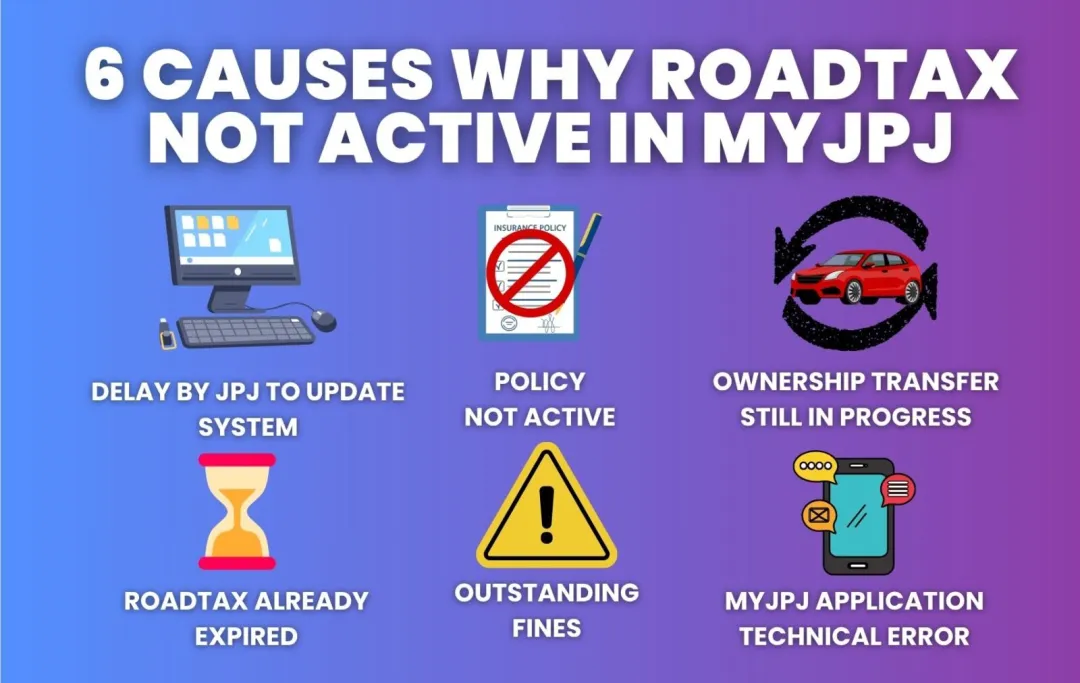
Here are the common reasons why your roadtax may appear inactive or not updated in MyJPJ, and what you can do about it.
1. Your Roadtax Has Already Expired
According to JPJ, the status “Tidak Berkuatkuasa” means that your LKM is no longer valid because it has expired.
So, if your roadtax has passed its expiry date, the status will not show as active.
Solution:
Check your roadtax expiry date in MyJPJ.
If it has expired, renew your roadtax before driving the vehicle on the road.
You can renew your roadtax online through BJAK if your vehicle meets the renewal requirements.
2. Your Roadtax Was Recently Renewed
If you have just renewed your roadtax but MyJPJ is still showing the old information, the displayed record may need to be refreshed.
There is no official JPJ rule stating that every renewal takes 1–3 working days to appear. So, avoid assuming that you have to wait a fixed number of days.
Solution:
Check your latest renewal confirmation and open your e-LKM in MyJPJ again.
If the information still does not appear correctly, use the “Jana Semula” function in MyJPJ to refresh the record.
If the problem continues, contact JPJ for assistance.
3. Your Insurance Information Is Not Updated
You need valid motor insurance coverage to renew your LKM.
MyJPJ also displays the insurance expiry date together with your digital e-LKM.
If you have recently renewed your insurance but the information shown in MyJPJ does not match your latest policy, check your insurance policy or contact your insurer or renewal platform to confirm the policy details.
Solution:
Check:
- Your insurance policy number
- Insurance start date
- Insurance expiry date
- Vehicle registration number
- Whether the policy is for the correct vehicle
If everything is correct but MyJPJ still shows outdated information, contact JPJ or the relevant insurer for assistance.
4. Vehicle Ownership Information Has Not Been Updated
If you recently bought a used car or completed a vehicle ownership transfer, make sure the transfer has been successfully recorded by JPJ.
MyJPJ displays vehicle information linked to your JPJ record.
If the ownership transfer has not been completed, the vehicle may not appear under your account as expected.
Solution:
Check your ownership status with JPJ.
Once the transfer has been completed, check MyJPJ again to see whether the vehicle information has been updated.
5. There Is a JPJ Restriction on the Vehicle
Certain JPJ restrictions can affect transactions involving a vehicle.
MyJPJ allows users to check information such as JPJ summonses and blacklist status.
If you are unable to renew your roadtax, check whether there is a restriction or other issue that needs to be resolved first.
Solution:
Check your JPJ records through MyJPJ or the JPJ Public Portal.
If there is a restriction, contact JPJ to find out what needs to be settled before you can proceed with the renewal.
6. MyJPJ Is Having a Technical Problem
Sometimes, the issue may simply be related to the app or your internet connection.
For example, JPJ states that a long loading time can be caused by the user’s mobile network connection.
If the e-LKM screen is blank or you cannot access your digital information, you can contact the MyJPJ technical support team.
JPJ MyJPJ support:
- Email: [email protected]
- Phone: 03-2724 2522
You can also make sure your MyJPJ app is updated and try again using a stable internet connection.
Quick Reference: Roadtax Not Active in MyJPJ
| Possible Cause | What You Can Do |
|---|---|
| Roadtax has expired | Renew your roadtax |
| Recently renewed roadtax | Refresh the information and use “Jana Semula” if available |
| Insurance information is outdated | Check your latest insurance policy |
| Ownership transfer is incomplete | Confirm the transfer with JPJ |
| JPJ restriction | Check your JPJ records and resolve the restriction |
| MyJPJ technical issue | Check your connection or contact JPJ support |
What Does “Tidak Berkuatkuasa” Mean in MyJPJ?
The wording can be confusing.
According to JPJ:
Berkuatkuasa means your LKM or driving licence is still valid and has not expired.
Tidak Berkuatkuasa means your LKM or driving licence is no longer valid because it has expired.
So, if your roadtax shows “Tidak Berkuatkuasa”, first check the expiry date before assuming that there is a problem with the MyJPJ system.
Can I Still Access My Digital Roadtax Without Internet?
Yes, under certain conditions.
JPJ states that your digital e-LKM can still be accessed without an internet connection if:
- You have not logged out of MyJPJ, and
- You previously accessed your e-LKM while you had an internet connection.
JPJ also allows users to access the digital e-LKM through the Public JPJ Portal. If necessary, users can print or take a screenshot of the e-LKM as a copy.
How to Check Your Roadtax in MyJPJ
You can check your digital roadtax directly in the app:
- Log in to MyJPJ.
- Go to Profile.
- Select Lesen Kenderaan Motor.
- Select your vehicle.
- Check the e-LKM status and expiry date.
MyJPJ also displays the insurance expiry date together with the e-LKM information.
Renew Your Roadtax and Insurance with BJAK
If your roadtax has expired or is approaching its expiry date, make sure your insurance coverage is also valid before renewing your LKM.
You can compare car insurance quotes through BJAK and arrange your roadtax renewal online.
Before renewing, check your:
- Insurance expiry date
- Roadtax expiry date
- Vehicle details
- NCD
- Available insurance coverage
Once your renewal is completed, check your e-LKM again in MyJPJ.